
Math books live at the bottom of a buffet table in the breakfast area because that’s where we do math in the morning. Independent work books live in the kids’ desks in our school room. Laptops are kept on a dedicated shelf in my bedroom — turned in every night, retrieved every morning. Supplies are in the dining room cabinet. More books in the dining room buffet. And in the kitchen, right in the middle of grand central station, hangs a wall file organizer holding seven clipboards — one for each of my kids — each one telling that child exactly what they need to accomplish this week.
It’s not a Pinterest-worthy homeschool room. It’s a real house that a real family of nine actually lives in. But it works, and that’s what I’m here to talk about.
The problem I was trying to solve
When you have multiple adults helping educate your kids — in our case, my husband, my mom, my sister, a friend, and me — you cannot afford miscommunication. I needed every adult who walked through our door to be able to pick up a clipboard, look at it, and know exactly what that child was supposed to do that day without having to ask me. I also needed my kids to stop “forgetting” what I had told them to do, which — funny how that works — happened a lot less once everything was written down in black and white.
But the bigger breakthrough came about two years into our homeschooling journey when I realized we had a serious afternoon problem. We had gradually added subjects over the years — more depth, more breadth, more everything — and I had structured the week so that every subject got a little time every single day. It sounded balanced. It wasn’t.
What actually happened was that kids felt like the mountain of work in front of them was impossible to climb. So they slowed down. They complained. They dragged. And it was common for my kids to still be sitting at the table doing schoolwork at 5pm when I came downstairs from work. Something had to change — but I didn’t want to cut anything. I’d added those subjects for a reason.
So I tried something different. Instead of a little of everything every day, I started rotating subjects across the week. The same amount of total work, just restructured. And the exact same weekly workload suddenly got done in half the time.
Turns out kids work faster when they can see the finish line.
The weekly planner — what it is and how it works
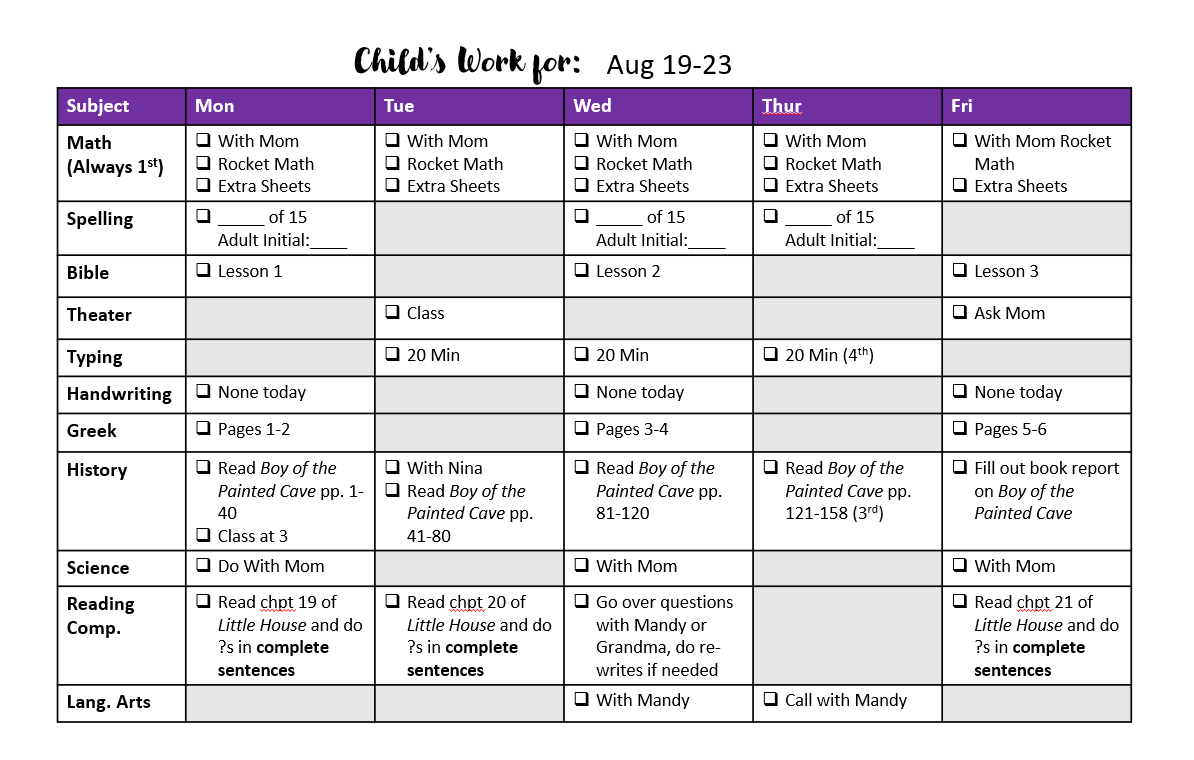
Every weekend during my planning session I open up my PowerPoint template and map out each child’s week. The format is simple: subjects run down the rows, days of the week run across the columns. Each cell tells the child exactly what to do in that subject on that day — or shows a blank if that subject doesn’t happen that day.
A few things worth knowing about how I fill it in:
Math is the only daily non-negotiable. Everything else rotates. A child might have history three days a week, science twice, Greek on Monday, Wednesday, and Friday. When a kid looks at their planner and sees “no science today,” they get a little mental boost instead of feeling buried. Same work, better attitude.
I plan around our actual week. When my sister came over on Wednesdays, Wednesday was our heaviest school day. Doctor’s appointment on Tuesday? I account for that. The planner reflects real life, not an idealized version of it.
Some subjects require an adult initial. Spelling, for example, has a line that says “Adult Initial: ___” next to it. This keeps kids honest on work that has a funny way of slipping their memory. In our family, checking something off that isn’t done is the equivalent of lying — and it’s treated accordingly.
Anything not completed by Friday becomes a Saturday task. It rarely happens, but when it does the lesson tends to stick. Nothing focuses a child for the following week quite like doing schoolwork on a Saturday morning while the neighborhood kids are outside playing.
I cross things off graciously when life happens. Sometimes I assigned too much. Sometimes an unexpected appointment ate two hours. When that happens I’ll take the planner, cross off something with a big marker, and let the kids cheer. It’s not failure — it’s flexibility. The planner serves the family, not the other way around.
The clipboard system
Once the planner is printed, it goes on a clipboard — each kid picked out their own from the store, so they’re all different colors. The clipboard lives in a wall file organizer in our kitchen when it’s not in use. Any adult in the house can grab it at a glance.
This solves a problem that I don’t think gets talked about enough in homeschool circles: the “can I go play?” moment. A kid comes to find you, eyes hopeful, asking if school is done. Instead of trying to remember what you assigned and what they’ve checked off, you just say “bring me your clipboard.” Half the time they’ll go to get it, realize they missed something, and disappear back to finish without ever coming back to ask. The standard is right there on the paper. It’s not up to mom’s memory or mom’s mood — it’s written down, agreed upon at the start of the week, and completely clear.
The digital version
This past year I switched to a digital version of the same system. I used Google AI Studio to build a simple app where I load the same weekly information and my kids check off their tasks from their laptops. The concept is identical — I just find it easier to monitor progress from my phone throughout the day rather than waiting to physically check the clipboard at the end of the night.
I’ll do a full post on the digital version once we’ve pressure-tested it a bit more. For now, the paper system is fully proven and honestly still the better starting point for most families.
What if this looks overwhelming?
I know what you’re thinking. This is a lot.
But here’s what I want you to hear: it only looks like a lot because I’m fitting an entire week on one page. You don’t have to do it that way. Start with a simple Word document. Put each day on a different page. Print it, stick it on a clipboard, hand it to your child.
That’s it. That’s the system.
The real magic isn’t the format — it’s giving your kids visibility into their own week. Most homeschool moms plan their week for themselves, in their own planner, and then dole out assignments one at a time. What I’ve found is that when kids can see their own week — all of it, laid out in front of them — something shifts. They start to take ownership. They make choices. They feel the satisfaction of checking things off themselves.
They’re old enough to read, they’re old enough to manage a planner. And the hour you spend setting it up on Sunday will come back to you tenfold before Thursday.
Download the template
If you want to try this system in your own homeschool, I’ve made my weekly planner template available as a free download. It’s a PowerPoint file so you can edit it directly — change the subjects, adjust the days, make it work for your family. No email required, just click below and it’s yours.
Comments
2 responses
Outstanding post but I was wondering if you could write a litte more on this
topic? I’d be very thankful if you could elaborate a little bit further.
Appreciate it!
I’d be happy to! What specifically would you like more info on? Would an example of a filled out planner sheet help? I’d love to help, just need to know what specific question I can answer 🙂