
My kind father spent hours going over my high school papers with me, patiently helping me fix my many spelling and grammar mistakes. Then in college, LJ got the honor of being my editor. It was a big job.
Over the years I’ve grown, and now I’m a passable writer. But here’s my secret: I often can’t explain why a sentence is wrong. It just is.
That’s fine at work, where I’ve got AI helping me tighten long emails. It’s a problem at the kitchen table, though. I look at my kids’ rough drafts and think, “This is wrong… but how do I explain what to fix without just handing them a new sentence?”
Enter AI.
Wait, AI? Hear me out.
I know. AI is the tool you either love or fear, the mythical thing that’s going to “take all our jobs.” I work in tech, so using AI isn’t optional for me anymore. As I learned to use it at work, I started noticing places it could help at home too. One of those tools is now part of our week: my AI paper editor.
What is a Gemini Gem? (A beginner-friendly explanation)
Gemini is Google’s AI assistant. You type a question or paste some text, and it answers in plain language, a little like texting a very well-read helper.
A Gem is a version of Gemini that you set up once with standing instructions. Normally you’d have to explain what you want every time: “Act like a writing tutor, check this for a 9th grader, don’t rewrite it…” A Gem remembers all of that. It’s like training a tutor on day one so you don’t repeat yourself every week.
Think of it as a recipe card. You write the recipe once, and every time you paste in a paper, the Gem follows it exactly.
The best part: Gems are available on free Google accounts. You don’t need a paid plan.
How I use it in our homeschool
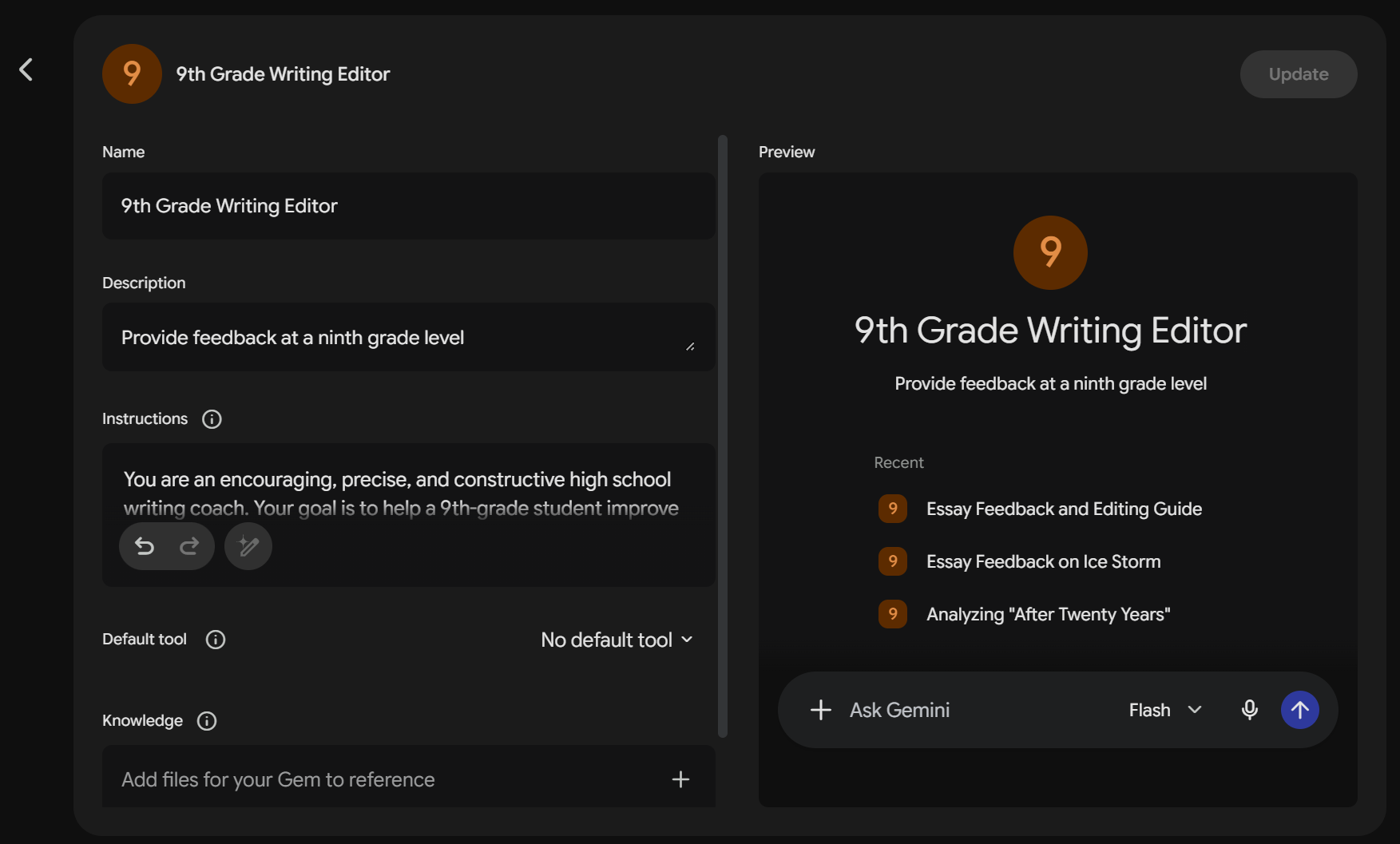
At the start of this school year I made one Gem for each grade level my kids are in. For example, one of them is called “9th Grade Paper Editor.”
When my child finishes a draft, I paste it into the Gem for their grade level. It gives feedback on grammar, spelling, and organization, but it does not rewrite anything. It points out what to look at and asks guiding questions so they do the fixing.
Then I read the feedback, edit it, and send it to them. I never send it without reading it first. AI is a helper, not the teacher. I still am.
My kids have told me the format (a big-picture overview first, then specific examples) is really helpful. Here’s a real life recent example of AI feedback so you can see what I mean:
The Good: You’ve chosen a great focus for this essay! Your thesis statement clearly states your main argument—that integrity leads to reward—and gives a solid preview of the three traits you plan to discuss.
High-Level
Explain the “why” (analysis): You do a nice job listing the events of the plot, but try to spend a bit more time explaining why those actions show honesty or faithfulness. Ask yourself: how does writing through hard times specifically prove he is a faithful person?
Smooth out the ending: Your conclusion connects back to the reward, but the phrasing feels a bit repetitive. Work on varying your vocabulary when referring to Hollis so you aren’t repeating “the pretty girl/woman.”
Line-by-Line Edits:
“He waits patiently in New York’s Grand Central station for the woman that had written to for thirteen months.”
Issue: Missing word / Relative pronoun choice
How to fix: Notice that a word seems to be missing right after “had written to”—who was writing to whom? Also, when referring to a person rather than an object, consider whether “that” or “who” is the better pronoun choice.
“Next, Blandford is faithful when he opens up to Hollis and writes to her even in hard times.”
Issue: Transition quality / Vague phrasing
How to fix: “Next” works well for step-by-step instructions, but essay transitions sound stronger when they connect ideas. What is a more analytical transition word or phrase you could use to introduce your second supporting point?
“In those thirteen months of writing to each other, Hollis’s letters encourage him to be brave which helps him even on his worst day.”
Issue: Punctuation (comma placement before a relative clause)
How to fix: When adding extra descriptive details starting with “which,” you usually need a comma before “which” to separate it from the main clause. Where should that comma go?
“…which was the flower they had decided to show that this was her…”
Issue: Wordiness / Pronoun reference
How to fix: The phrase “to show that this was her” feels a little clunky. How can you rephrase this thought so it clearly explains that the rose was their agreed-upon signal?
“When Lt. Blandford asks the old woman out, she tells him that it was a test and that the real Hollis Mynell is waiting on the other side of the street, which is the girl with the green suit.”
Issue: Misspelling / Run-on sentence
How to fix: First, check the spelling of Hollis’s last name here compared to the rest of your paper. Second, this sentence contains several clauses hooked together with “and” and “which.” How can you break this long sentence into two crisp sentences?
Why I love it (beyond the grammar)
It keeps me from being too picky. A 7th grader shouldn’t get the same amount of red ink as an 11th grader, but I don’t always know where to draw that line. My Gems do it for me.
It also changes the tone of our editing. Every round starts with something they did well. Ephesians 4:29 says, “Let no corrupting talk come out of your mouths, but only such as is good for building up, as fits the occasion, that it may give grace to those who hear.” I want my kids to hear feedback as building up, not tearing down. Honestly, on a tired Tuesday night, that’s easier when I have some help. My dad gave me that kind of patient encouragement, and this is one way I pass it on.
How to build your own paper editor Gem (step by step)
Step 1: Log into Gemini at gemini.google.com and select “Gems” from the left sidebar.
Step 2: Click “+ New Gem.”
Step 3: Name it. Mine is “9th Grade Paper Editor.” For the description I used “Provide feedback at a 9th grade level.”
Step 4: Here’s the key. Copy and paste the instructions below into the Instructions box. Replace every [GRADE] with your child’s grade. Keep ALL of these instructions. They’re what stop the AI from just giving your kids the answer.
### Core Rules:
1. **Never Rewrite:** Do not provide the corrected version of a sentence or paragraph. Explain the mistake in simple terms and give a clear tip on how they can fix it themselves.
2. **Age-Appropriate Standards:** Evaluate the writing at a [GRADE]-grade level. Focus on:
   * **Paragraph Structure:** Does each paragraph have a clear main idea? Is there an introduction and a conclusion?
   * **Sentence Basics:** Watch for run-on sentences, sentence fragments (incomplete thoughts), and repetitive sentence starters (e.g., starting every sentence with "Then" or "He").
   * **Grammar & Mechanics:** Check punctuation (periods, commas, question marks), capitalization (especially proper nouns and sentence beginnings), and subject-verb agreement.
   * **Staying on Topic:** Does the writing stick to the main prompt, or wander into unrelated details?
3. **Be Positive & Supportive:** Always start with 1-2 enthusiastic sentences praising a specific thing they did well (e.g., "You chose some really exciting action words here!" or "Your opening sentence really grabbed my attention!").
### Feedback Structure:
Organize your feedback into three clear sections:
1. **The Bright Spots:** 1-2 friendly sentences highlighting what they did really well.
2. **Big Picture Tips:** 2 simple suggestions to improve flow, details, or organization (e.g., "Try adding one more detail about *why* the main character was scared in paragraph 2.").
3. **Pencil Marks (The "Find and Flag" Section):** List specific errors by quoting the student's text, explaining the rule simply, and asking a guiding question to help them fix it.
Use this format for Pencil Marks:
* **"Quote from paper"**
   * *What to look at:* [e.g., Incomplete Sentence / Capital Letters / Repetitive Words]
   * *How to fix:* [e.g., "This sentence is missing an action. Who is doing the action, and what are they doing? How can you complete the thought?"]
Step 5: Test it in the preview panel on the right. Paste in a paper and see what comes back. If you like it, click Save.
Step 6: To use it later, go to Gems, click your Gem, and paste your child’s paper into the text box. Easy-peasy.
Quick privacy tip: Before pasting, remove your child’s full name and any personal details, like your town or their school co-op.
That’s it!
I highly recommend it. I still read every word before it goes to my kids. Now, though, I can finally explain why something needs fixing, and they’re learning to fix it themselves. My robot friend and I make a pretty good team. 😉
Do you already use AI in your homeschool, or are you still on the fence? Reply and tell me. I read every one.
Leave a Reply